Domain reputation history
Review available Google Domain Reputation history and keep previously collected reputation data stored locally for longer-term comparison.

Connect Google Postmaster to track Gmail deliverability signals over time. Review spam rate, authentication, TLS, delivery errors and available reputation history from one CheckInbox dashboard.
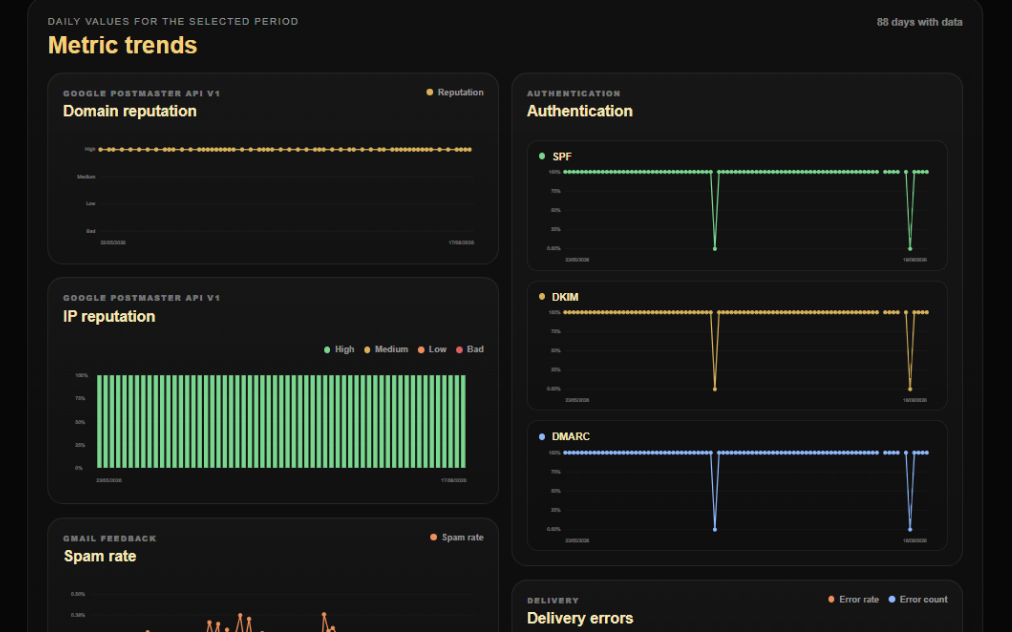
CheckInbox turns Google Postmaster data into a clearer historical view for ongoing Gmail deliverability monitoring.
Review available Google Domain Reputation history and keep previously collected reputation data stored locally for longer-term comparison.
Inspect available IP Reputation signals when Google provides them and compare reputation changes across the selected period.
Track user-reported spam rate over time instead of reviewing isolated daily values.
Monitor authentication success ratios reported by Google Postmaster and spot changes that may require investigation.
Review inbound and outbound TLS metrics together with Gmail delivery error rate and error-count trends.
Connect multiple supported Google Postmaster accounts, switch between available domains and review historical data from one interface.
Your sending domain must already be available in Google Postmaster Tools for the connected Google account.
Sign in to CheckInbox and open the Postmaster module from your customer account.
Authorize the Google account that has access to the domains you manage in Google Postmaster Tools.
Select a verified domain returned by Google for the connected Postmaster account.
Use the date-range controls to review recent performance or a wider historical period when Google data is available.
Compare reputation, spam, authentication, TLS and delivery-error signals to identify meaningful Gmail deliverability changes.
Google Postmaster data is provided by Google and may be delayed, sparse or unavailable for some domains and dates. Legacy Domain Reputation and IP Reputation signals are shown while Google continues to expose them and should not be treated as permanently guaranteed metrics. CheckInbox stores previously collected history locally, but Postmaster monitoring does not guarantee inbox placement.